5.5 标签石头剪刀布#
5.5.1 简介#
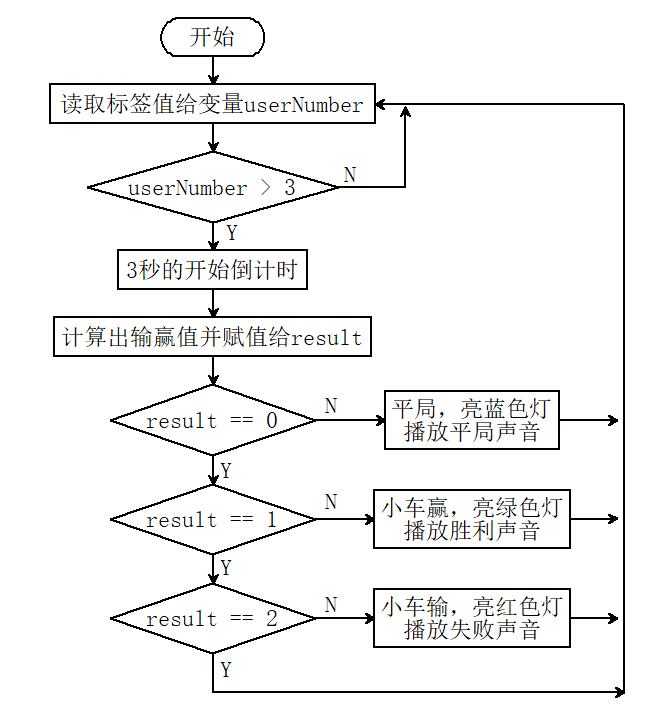
标签石头剪刀布,使用16h5标签的0(石头),1(剪刀),2(布)代表手势的石头剪刀布与小车进行输赢比赛,小车会随机生成0(石头),1(剪刀),2(布),如果小车赢了小车会发出胜利的声音并亮绿灯,如果小车输了小车会发出失败的声音并亮红灯,如果是平局则发出平局的声音并亮蓝灯。
5.5.2 流程图#
5.5.3 代码#
#include <Arduino.h>
#include <Sentry.h>
#include <Adafruit_NeoPixel.h>

#define PIN A3
Adafruit_NeoPixel strip = Adafruit_NeoPixel(4, PIN, NEO_GRB + NEO_KHZ800);

typedef Sengo2 Sengo;

#define SENGO_I2C
// #define SENGO_UART

#ifdef SENGO_I2C
#include <Wire.h>
#endif
#ifdef SENGO_UART
#include <SoftwareSerial.h>
#define TX_PIN 11
#define RX_PIN 10
SoftwareSerial mySerial(RX_PIN, TX_PIN);
#endif

#define VISION_TYPE Sengo::kVisionAprilTag
Sengo sengo;


#define BUZZER_PIN 3

int left_speed = 255;
int right_speed = 255;

String gesture[3] = { "石头", "剪刀", "布" };


void setup() {
  sentry_err_t err = SENTRY_OK;

  Serial.begin(9600);

  Serial.println("Waiting for sengo initialize...");
#ifdef SENGO_I2C
  Wire.begin();
  while (SENTRY_OK != sengo.begin(&Wire)) {
    yield();
  }
#endif  // SENGO_I2C
#ifdef SENGO_UART
  mySerial.begin(9600);
  while (SENTRY_OK != sengo.begin(&mySerial)) {
    yield();
  }
#endif  // SENGO_UART
  Serial.println("Sengo begin Success.");
  err = sengo.VisionSetMode(VISION_TYPE, Sengo::kVisionModeFamily16H5);
  err = sengo.VisionSetLevel(VISION_TYPE, kLevelSpeed);
  if (err) {
    Serial.print("sengo.VisionSetMode Error: 0x");
    Serial.println(err, HEX);
  }
  err = sengo.VisionBegin(VISION_TYPE);
  Serial.print("sengo.VisionBegin(kVisionAprilTag) ");
  if (err) {
    Serial.print("Error: 0x");
  } else {
    Serial.print("Success: 0x");
  }
  Serial.println(err, HEX);

  pinMode(BUZZER_PIN, OUTPUT);

  strip.begin();
  strip.show();  // Initialize all pixels to 'off'
}

void loop() {

  int randomNumber = random(3);  //随机生成0,1,2数字
  int result = 0;

  int obj_num = sengo.GetValue(VISION_TYPE, kStatus);
  if (obj_num) {
    for (int i = 1; i <= obj_num; ++i) {
      int userNumber = sengo.GetValue(VISION_TYPE, kLabel, i);
      if (userNumber < 3) {
        countdown(2);
        playStartSound();
        result = (userNumber - randomNumber + 3) % 3;
        Serial.print("机器人出:");
        Serial.print(gesture[randomNumber]);
        Serial.print("    人出:");
        Serial.print(gesture[userNumber]);
        Serial.print("    机器人说:");
        if (result == 0) {
          Serial.println("平局");
          drawSound();
          colorWipe(strip.Color(0, 0, 255), 50);  // 亮蓝灯
        } else if (result == 1) {
          Serial.println("我赢了!");
          victorySound();
          colorWipe(strip.Color(0, 255, 0), 50);  // 亮绿灯
        } else if (result == 2) {
          Serial.println("我输了!");
          defeatSound();
          colorWipe(strip.Color(255, 0, 0), 50);  // 亮红灯
        }
      } else {
        break;
      }
    }
  }
}

// Fill the dots one after the other with a color
void colorWipe(uint32_t c, uint8_t wait) {
  for (uint16_t i = 0; i < strip.numPixels(); i++) {
    strip.setPixelColor(i, c);
    strip.show();
    delay(wait);
  }
}

void countdown(int seconds) {
  for (int i = seconds; i > 0; i--) {
    // 倒计时滴答声
    tone(BUZZER_PIN, 800, 100);
    delay(200);
    noTone(BUZZER_PIN);

    // 间隔时间
    delay(800);
  }
}

void playStartSound() {
  // 游戏开始音效 - 上升音阶+结束音
  tone(BUZZER_PIN, 523, 100);  // C5
  delay(120);
  tone(BUZZER_PIN, 659, 100);  // E5
  delay(120);
  tone(BUZZER_PIN, 784, 100);  // G5
  delay(120);
  tone(BUZZER_PIN, 1046, 300);  // C6高音
  delay(350);
  noTone(BUZZER_PIN);
}


void victorySound() {
  // 胜利:轻快节奏(哒-哒哒)
  tone(BUZZER_PIN, 587, 150);  // D5
  delay(200);
  tone(BUZZER_PIN, 784, 100);  // G5
  delay(120);
  tone(BUZZER_PIN, 1046, 200);  // C6
  delay(250);
  noTone(BUZZER_PIN);
}

void defeatSound() {
  // 失败:缓慢双低音(嘟...嘟...)
  tone(BUZZER_PIN, 220, 400);  // A3
  delay(500);
  tone(BUZZER_PIN, 196, 600);  // G3
  delay(700);
  noTone(BUZZER_PIN);
}

void drawSound() {
  // 平局:平稳颤音
  for (int i = 0; i < 3; i++) {
    tone(BUZZER_PIN, 349, 80);  // F4
    delay(100);
    tone(BUZZER_PIN, 330, 80);  // E4
    delay(100);
  }
  noTone(BUZZER_PIN);
}
5.5.4 代码结果#
上传代码成功后,AI视觉模块会对拍到的画面进行识别,判断是否有16h5类型的标签,如果有则将标签值传输给开发板。我们可以随机将标签值为“0,1,2”的卡片放到摄像头识别区与小车进行猜拳,如果是平局小车会亮蓝色灯并发出平局的音效,如果是小车赢了那么小车会亮绿灯并发出胜利了的音效,如果是小车输了那么小车会亮红灯并发出失败了的音效。