KE0156 KEYES W5500网络扩展板#
1. 说明#
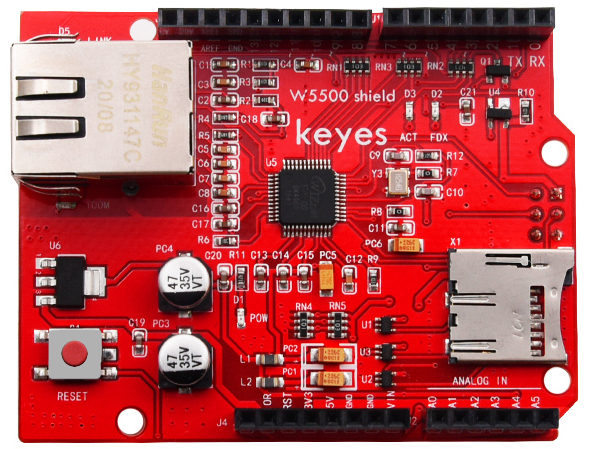
KEYES W5500网络扩展板 板载以 W5500 为核心的网络模块,可以使其成为简单的 Web 服务器,或者通过网络控制读写的数字和模拟接口等网络应用。它可以同时兼容 KEYES UNO R3 开发板和 KEYES 2560 R3 开发板。
使用时,我们可以在控制板上上传对应程序,实现一个简单的 Web 服务器。同时,该扩展板还支持 mini SD 卡(TF 卡,最大支持内存为 1G)读写。这个扩展板采用了可堆叠的设计,可直接插到控制板上,同时其他扩展板也可以插在这个扩展板上。扩展板还自带 4 个直径为 3mm 的固定孔,方便固定到其他设备。
2. 技术参数#
输入电压:DC 5V
工作电压:DC 3.3V
工作电流:约 380mA
最大功率:3W
工作温度:-55℃ ~ +75℃
网络变压器接口类型:RJ-45 接口
排母间距:2.54mm
固定孔直径:3mm
尺寸:69mm × 53mm × 28mm
重量:24.5g
mini SD 卡(TF 卡)大小:最大 1G
TF 卡座:自弹出式
W5500 特性:
全硬件 TCP/IP 协议栈网络芯片
支持高速 SPI 总线(SPI 模式 0,3)
支持硬件 TCP/IP 协议:TCP, UDP, ICMP, IPv4 ARP, IGMP, PPPoE
内嵌 10/100Mbps 以太网物理层
支持自动应答(全双工/半双工模式)
多种指示灯信号输出(全/半双工)
支持 8 个独立的端口同时连接
内部 32K 字节存储器作 TX/RX 缓存
支持休眠模式和网络唤醒
3.3V 工作电压,I/O 口可承受 5V 电压
极小巧的 48P/N LQFP 无铅封装
3. 测试代码#
注意:上传代码之前,必须将对应的库文件放置到安装 Arduino IDE 的库文件夹中。
代码 A#
#include <SPI.h>
#include <Ethernet55.h>

// set MAC address
#if defined(WIZ550io_WITH_MACADDRESS) // Use assigned MAC address of WIZ550io
;
#else
byte mac[] = {0xDE, 0xAD, 0xBE, 0xEF, 0xFE, 0xED};
#endif

void setup()
{
  Serial.begin(9600);
  if (Ethernet.begin(mac) == 0)
  {
      Serial.println("Failed to configure Ethernet using DHCP");
      // connection fails, stop program run.
      for(;;);
  }
  // print out your local IP address
  Serial.print("My IP address: ");
  for (byte thisByte = 0; thisByte < 4; thisByte++)
  {
    // print out four byte IP address
    Serial.print(Ethernet.localIP()[thisByte], DEC);
    Serial.print(".");
  }
  Serial.println();
}

void loop()
{
}
代码 B#
#include <SdFat.h>
#include <SdFatUtil.h>
#include <Ethernet55.h>
#include <SPI.h>

/************ ETHERNET STUFF ************/
byte mac[] = { 0xDE, 0xAD, 0xBE, 0xEF, 0xFE, 0xED };  //MAC address
byte ip[] = { 192, 168, 1, 126 };     //IP address
EthernetServer server(80);

/************ SDCARD STUFF ************/
Sd2Card card;
SdVolume volume;
SdFile root;
SdFile file;

// store error strings in flash to save RAM
#define error(s) error_P(PSTR(s))

void error_P(const char* str) {
  PgmPrint("error: ");
  SerialPrintln_P(str);
  if (card.errorCode()) {
    PgmPrint("SD error: ");
    Serial.print(card.errorCode(), HEX);
    Serial.print(',');
    Serial.println(card.errorData(), HEX);
  }
  while(1);
}

void setup() {
  Serial.begin(9600);

  PgmPrint("Free RAM: ");
  Serial.println(FreeRam());

  // initialize the SD card at SPI_HALF_SPEED to avoid bus errors with
  // breadboards.  use SPI_FULL_SPEED for better performance.
  pinMode(10, OUTPUT);                       // set the SS pin as an output (necessary!)
  digitalWrite(10, HIGH);                    // but turn off the W5500 chip!

  if (!card.init(SPI_HALF_SPEED, 4)) error("card.init failed!");

  // initialize a FAT volume
  if (!volume.init(&card)) error("vol.init failed!");

  PgmPrint("Volume is FAT");
  Serial.println(volume.fatType(),DEC);
  Serial.println();

  if (!root.openRoot(&volume)) error("openRoot failed");

  // list file in root with date and size
  PgmPrintln("Files found in root:");
  root.ls(LS_DATE | LS_SIZE);
  Serial.println();

  // Recursive list of all directories
  PgmPrintln("Files found in all dirs:");
  root.ls(LS_R);

  Serial.println();
  PgmPrintln("Done");

  // Debugging complete, we start the server!
  Ethernet.begin(mac, ip);
  server.begin();
}

void ListFiles(EthernetClient client, uint8_t flags) {
  // This code is just copied from SdFile.cpp in the SDFat library
  // and tweaked to print to the client output in html!
  dir_t p;

  root.rewind();
  client.println("<ul>");
  while (root.readDir(&p) > 0) {
    // done if past last used entry
    if (p.name[0] == DIR_NAME_FREE) break;

    // skip deleted entry and entries for . and  ..
    if (p.name[0] == DIR_NAME_DELETED || p.name[0] == '.') continue;

    // only list subdirectories and files
    if (!DIR_IS_FILE_OR_SUBDIR(&p)) continue;

    // print any indent spaces
    client.print("<li><a href=\"");
    for (uint8_t i = 0; i < 11; i++) {
      if (p.name[i] == ' ') continue;
      if (i == 8) {
        client.print('.');
      }
      client.print((char)p.name[i]);
    }
    client.print("\">");

    // print file name with possible blank fill
    for (uint8_t i = 0; i < 11; i++) {
      if (p.name[i] == ' ') continue;
      if (i == 8) {
        client.print('.');
      }
      client.print((char)p.name[i]);
    }

    client.print("</a>");

    if (DIR_IS_SUBDIR(&p)) {
      client.print('/');
    }

    // print modify date/time if requested
    if (flags & LS_DATE) {
       root.printFatDate(p.lastWriteDate);
       client.print(' ');
       root.printFatTime(p.lastWriteTime);
    }
    // print size if requested
    if (!DIR_IS_SUBDIR(&p) && (flags & LS_SIZE)) {
      client.print(' ');
      client.print(p.fileSize);
    }
    client.println("</li>");
  }
  client.println("</ul>");
}

// How big our line buffer should be. 100 is plenty!
#define BUFSIZ 100

void loop()
{
  char clientline[BUFSIZ];
  int index = 0;

  EthernetClient client = server.available();
  if (client) {
    // an http request ends with a blank line
    boolean current_line_is_blank = true;

    // reset the input buffer
    index = 0;

    while (client.connected()) {
      if (client.available()) {
        char c = client.read();

        // If it isn't a new line, add the character to the buffer
        if (c != '\n' && c != '\r') {
          clientline[index] = c;
          index++;
          // are we too big for the buffer? start tossing out data
          if (index >= BUFSIZ)
            index = BUFSIZ -1;

          // continue to read more data!
          continue;
        }
        // got a \n or \r new line, which means the string is done
        clientline[index] = 0;
        // Print it out for debugging
        Serial.println(clientline);

        // Look for substring such as a request to get the root file
        if (strstr(clientline, "GET / ") != 0) {
          // send a standard http response header
          client.println("HTTP/1.1 200 OK");
          client.println("Content-Type: text/html");
          client.println();

          // print all the files, use a helper to keep it clean
          client.println("<h2>Files:</h2>");
          ListFiles(client, LS_SIZE);
        } else if (strstr(clientline, "GET /") != 0) {
          // this time no space after the /, so a sub-file!
          char *filename;

          filename = clientline + 5; // look after the "GET /" (5 chars)
          // a little trick, look for the " HTTP/1.1" string and
          // turn the first character of the substring into a 0 to clear it out.
          (strstr(clientline, " HTTP"))[0] = 0;

          // print the file we want
          Serial.println(filename);

          if (! file.open(&root, filename, O_READ)) {
            client.println("HTTP/1.1 404 Not Found");
            client.println("Content-Type: text/html");
            client.println();
            client.println("<h2>File Not Found!</h2>");
            break;
          }

          Serial.println("Opened!");

          client.println("HTTP/1.1 200 OK");
          client.println("Content-Type: text/plain");
          client.println();

          int16_t c;
          while ((c = file.read()) > 0) {
              // uncomment the serial to debug (slow!)
              //Serial.print((char)c);
              client.print((char)c);
          }
          file.close();
        } else {
          // everything else is a 404
          client.println("HTTP/1.1 404 Not Found");
          client.println("Content-Type: text/html");
          client.println();
          client.println("<h2>File Not Found!</h2>");
        }
        break;
      }
    }
    // give the web browser time to receive the data
    delay(1);
    client.stop();
  }
}
代码 C#
#include <SPI.h>
#include <Ethernet55.h>

// Enter a MAC address and IP address for your controller below.
// The IP address will be dependent on your local network:
byte mac[] = {0xDE, 0xAD, 0xBE, 0xEF, 0xFE, 0xED };
IPAddress ip(192,168,1,126);//modifying according your own IP

// Initialize the Ethernet server library
// with the IP address and port you want to use
// (port 80 is default for HTTP):
EthernetServer server(80);

void setup() {
  // Open serial communications and wait for port to open:
  Serial.begin(9600);
  while (!Serial) {
    ; // wait for serial port to connect. Needed for Leonardo only
  }
  // start the Ethernet connection and the server:
  Ethernet.begin(mac, ip);
  server.begin();
  Serial.print("server is at ");
  Serial.println(Ethernet.localIP());
}

void loop() {
  // listen for incoming clients
  EthernetClient client = server.available();
  if (client) {
    Serial.println("new client");
    // an http request ends with a blank line
    boolean currentLineIsBlank = true;
    while (client.connected()) {
      if (client.available()) {
        char c = client.read();
        Serial.write(c);
        // if you've gotten to the end of the line (received a newline
        // character) and the line is blank, the http request has ended,
        // so you can send a reply
        if (c == '\n' && currentLineIsBlank) {
          // send a standard http response header
          client.println("HTTP/1.1 200 OK");
          client.println("Content-Type: text/html");
          client.println("Connection: close"); // the connection will be closed after completion
          // of the response
          client.println("Refresh: 1"); // refresh the page automatically every 1 sec
          client.println();
          client.println("<!DOCTYPE HTML>");
          client.println("<html>");
          // output the value of each analog input pin
          for (int analogChannel = 0; analogChannel < 6; analogChannel++) {
            int sensorReading = analogRead(analogChannel);
            client.print("analog input ");
            client.print(analogChannel);
            client.print(" is ");
            client.print(sensorReading);
            client.println("<br />");
          }
          client.println("</html>");
          break;
        }
        if (c == '\n') {
          // you're starting a new line
          currentLineIsBlank = true;
        } else if (c != '\r') {
          // you've gotten a character on the current line
          currentLineIsBlank = false;
        }
      }
    }
  }
  // give the web browser time to receive the data
  delay(1);
  // close the connection:
  client.stop();
  Serial.println("client disconnected");
}
4. 测试结果#
特别注意:我们测试时用的是 1.5.6 版本的 IDE,其他版本 IDE 可能不兼容。
测试前,应先将用到的库文件放至相应的 IDE 库目录里面。
测试时,利用方形接口 USB 线将控制板连接到电脑上。将扩展板堆叠在控制板上,在扩展板的网络变压器接口连接对应网线,将 mini SD 卡(TF 卡)插在扩展板 TF 卡座。
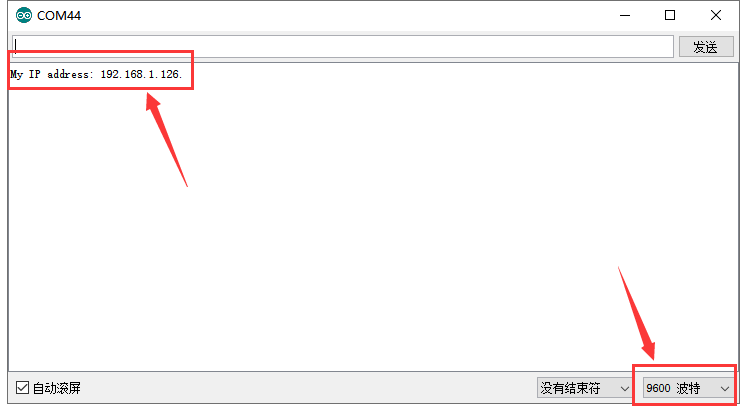
上传代码 A,上传完成后,打开串口监视器,设置波特率为 9600,按下复位按键,就可以看到相应的网络 IP 地址,为 192.168.1.126。
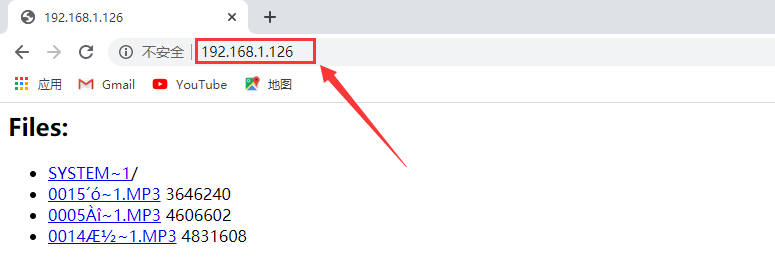
再将上传代码 B,代码 B 中的 IP 地址应当更改为上传代码 A 获取到的 IP 地址。上传成功,上电后,在浏览器地址栏输入获取的 IP 地址后,能在网页中显示当前 SD 卡中的内容。
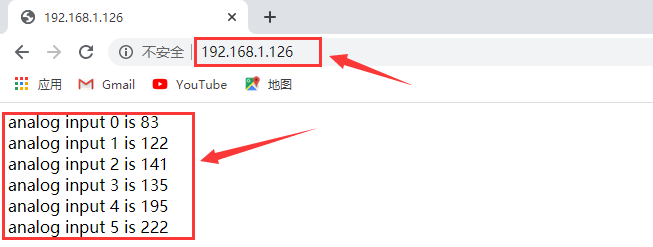
再将上传代码 C,代码 C 中的 IP 地址应当更改为上传代码 A 获取到的 IP 地址。上传成功,上电后,在浏览器地址栏输入获取的 IP 地址后,能在网页中显示 UNO 板上 A0-A5 读取的 6 个模拟值,每隔 1 秒刷新 1 次。
5. 相关资料链接#
百度网盘资料链接
提取码:uxro
如有更多疑问,请联系 Keyes 官方客服或加入相关创客社区交流。祝使用愉快!