Note
Hello, welcome to the SunFounder Raspberry Pi & Arduino & ESP32 Enthusiasts Community on Facebook! Dive deeper into Raspberry Pi, Arduino, and ESP32 with fellow enthusiasts.
Why Join?
Expert Support: Solve post-sale issues and technical challenges with help from our community and team.
Learn & Share: Exchange tips and tutorials to enhance your skills.
Exclusive Previews: Get early access to new product announcements and sneak peeks.
Special Discounts: Enjoy exclusive discounts on our newest products.
Festive Promotions and Giveaways: Take part in giveaways and holiday promotions.
👉 Ready to explore and create with us? Click [here] and join today!
7.1 Light Theremin
Theremin is an electronic musical instrument that does not require physical contact. Based on the position of the player’s hand, it produces different tones.
Its controlling section is usually made up of two metal antennas that sense the position of the thereminist’s hands and control oscillators with one hand and volume with the other. The electric signals from the theremin are amplified and sent to a loudspeaker.
We cannot reproduce the same instrument through Pico, but we can use photoresistor and passive buzzer to achieve similar gameplay.
Schematic
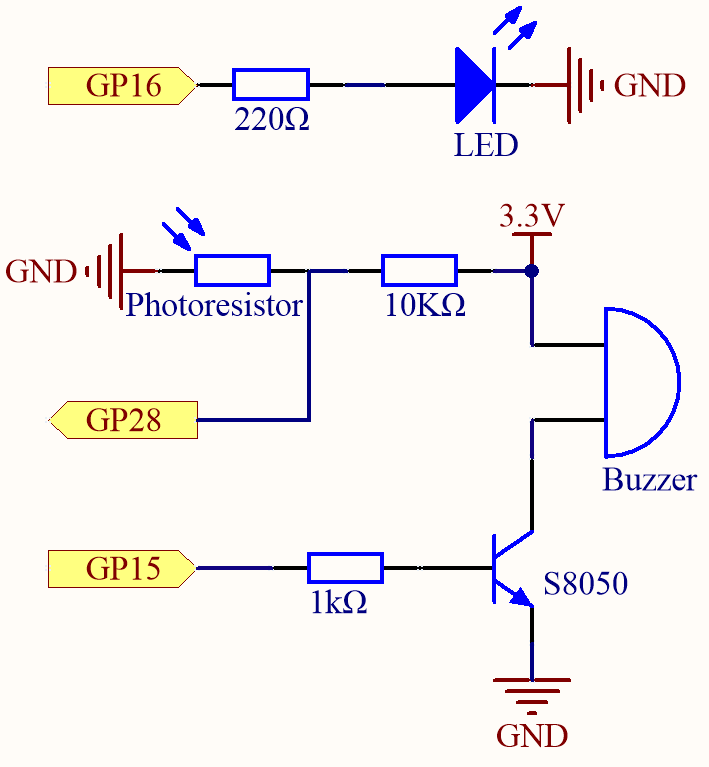
Before starting the project, wave your hand up and down over the photoresistor to calibrate the range of light intensity. The LED connected in GP16 is used to indicate the debugging time, and the LED is lit to indicate the start of debugging and off to indicate the end of debugging.
When GP15 outputs high level, S8050 (NPN transistor) conducts and the passive buzzer starts to sound.
When the light is stronger, GP28’s value is smaller; vice versa, it is larger when the light is weaker. By programming the value of the photoresistor to affect the frequency of the passive buzzer, a photosensitive device can be simulated.
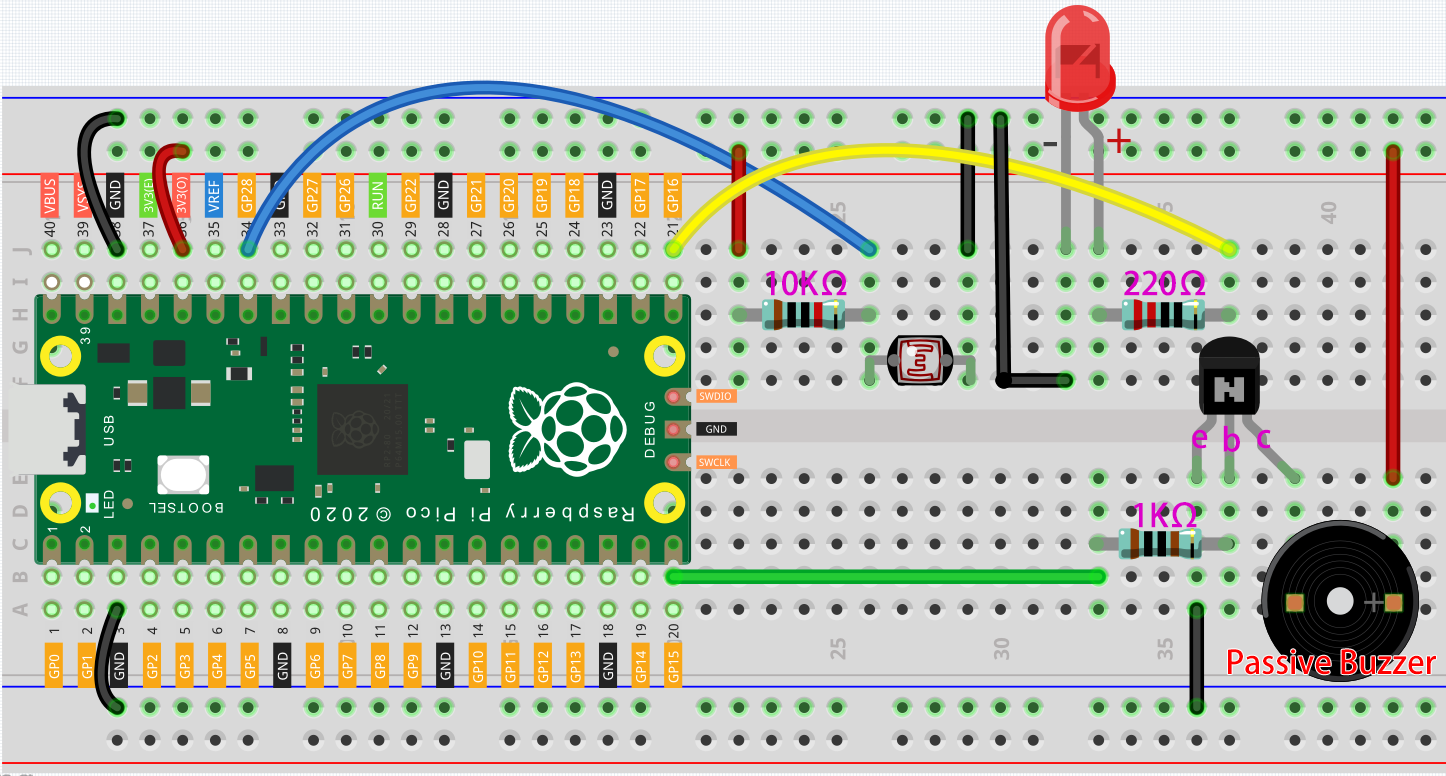
Wiring
Code
Note
Open the
7.1_light_theremin.pyfile under the path ofeuler-kit/micropythonor copy this code into Thonny, then click “Run Current Script” or simply press F5 to run it.Don’t forget to click on the “MicroPython (Raspberry Pi Pico)” interpreter in the bottom right corner.
For detailed tutorials, please refer to Open and Run Code Directly.
import machine
import utime

led = machine.Pin(16, machine.Pin.OUT)
photoresistor = machine.ADC(28)
buzzer = machine.PWM(machine.Pin(15))

light_low=65535
light_high=0

def interval_mapping(x, in_min, in_max, out_min, out_max):
    return (x - in_min) * (out_max - out_min) / (in_max - in_min) + out_min

def tone(pin,frequency,duration):
    pin.freq(frequency)
    pin.duty_u16(30000)
    utime.sleep_ms(duration)
    pin.duty_u16(0)

# calibrate the photoresistor max & min values.
timer_init_start = utime.ticks_ms()
led.value(1)
while utime.ticks_diff(utime.ticks_ms(), timer_init_start)<5000:
    light_value = photoresistor.read_u16()
    if light_value > light_high:
        light_high = light_value
    if light_value < light_low:
        light_low = light_value
led.value(0)

# play
while True:
    light_value  = photoresistor.read_u16()
    pitch = int(interval_mapping(light_value,light_low,light_high,50,6000))
    if pitch > 50 :
        tone(buzzer,pitch,20)
    utime.sleep_ms(10)
As soon as the program runs, the LED will light up, and we will have five seconds to calibrate the photoresistor’s detection range.
This is due to the different light environments we may have when we use it (e.g., different light intensities at noon and dusk), as well as our hands’ height above the photoresistor. You need to set the maximum and minimum height of your hand from the photoresistor, which is also the height at which you play the instrument.
After five seconds, the LED will turn off, at which point we can wave our hands over the photoresistor and play.