Note
Hello, welcome to the SunFounder Raspberry Pi & Arduino & ESP32 Enthusiasts Community on Facebook! Dive deeper into Raspberry Pi, Arduino, and ESP32 with fellow enthusiasts.
Why Join?
Expert Support: Solve post-sale issues and technical challenges with help from our community and team.
Learn & Share: Exchange tips and tutorials to enhance your skills.
Exclusive Previews: Get early access to new product announcements and sneak peeks.
Special Discounts: Enjoy exclusive discounts on our newest products.
Festive Promotions and Giveaways: Take part in giveaways and holiday promotions.
👉 Ready to explore and create with us? Click [here] and join today!
7.7 Guess Number
Guessing Numbers is a fun party game where you and your friends input numbers (0-99). With each input of the number, the range will shrink until a player answers the riddle correctly. Then the player is defeated and punished.
As an example, if the lucky number is 51, which the players cannot see, and the player 1 inputs 50, the prompt changes to 50 - 99; if the player 2 inputs 70, the range changes to 50 - 70; if the player 3 inputs 51, the player is unlucky. In this case, numbers are inputted through the keypad, and outcomes are displayed on a LCD screen.
Schematic
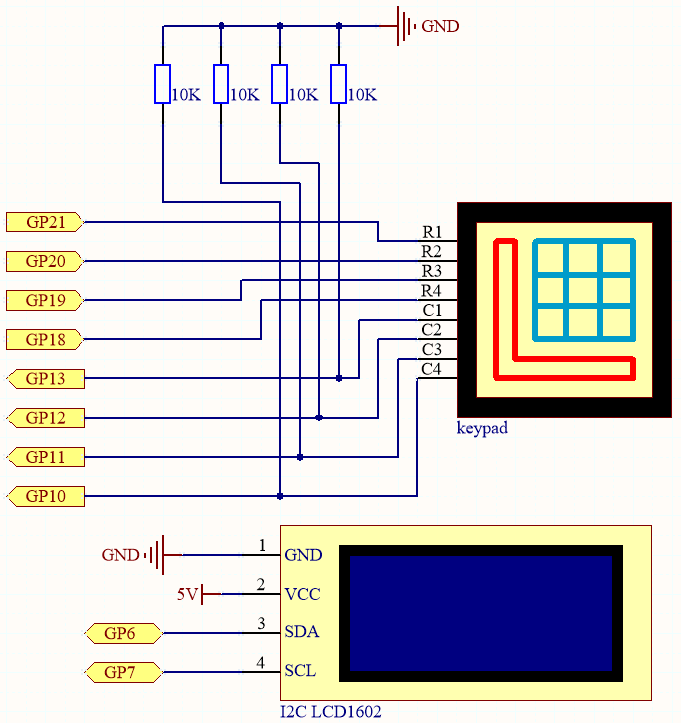
This circuit is based on 4.2 4x4 Keypad with the addition of an I2C LCD1602 to display the pressed keys.
Wiring

To make the wiring easier, in the above diagram, the column row of the matrix keyboard and the 10K resistors are inserted into the holes where G10 ~ G13 are located at the same time.
Code
Note
Open the
7.7_game_guess_number.pyfile under the path ofeuler-kit/micropythonor copy this code into Thonny, then click “Run Current Script” or simply press F5 to run it.Don’t forget to click on the “MicroPython (Raspberry Pi Pico)” interpreter in the bottom right corner.
For detailed tutorials, please refer to Open and Run Code Directly.
from lcd1602 import LCD
import machine
import time
import urandom


# keypad function
characters = [["1","2","3","A"],["4","5","6","B"],["7","8","9","C"],["*","0","#","D"]]

pin = [21,20,19,18]
row = []
for i in range(4):
    row.append(None)
    row[i] = machine.Pin(pin[i], machine.Pin.OUT)

pin = [13,12,11,10]
col = []
for i in range(4):
    col.append(None)
    col[i] = machine.Pin(pin[i], machine.Pin.IN)

def readKey():
    key = []
    for i in range(4):
        row[i].high()
        for j in range(4):
            if(col[j].value() == 1):
                key.append(characters[i][j])
        row[i].low()
    if key == [] :
        return None
    else:
        return key

# init/reset number
# reset the result as False for lcd show
def init_new_value():
global pointValue,upper,count,lower
pointValue = int(urandom.uniform(0, 99))
print(pointValue)
upper = 99
lower = 0
count = 0
return False


# lcd show message
# If target, show game over.
# If not target, or not detected, show guess number.
def lcd_show(result):
    lcd.clear()
    if result == True:
        string ="GAME OVER!\n"
        string +="Point is "+ str(pointValue)
    else :
        string ="Enter number: " + str(count) +"\n"
        string += str(lower)+ " < Point < " + str(upper)
    lcd.message(string)
    return

# detect number & reflesh show message
# if not target, reflesh number (upper or lower) and return False
# if target, return True
def number_processing():
    global upper,count,lower
    if count > pointValue:
        if count < upper:
            upper = count
    elif count < pointValue:
        if count > lower:
            lower = count
    elif count == pointValue:
        return True
    count = 0
    return False

## start
lcd = LCD()
string = "Welcome!\n"
string = "Press A to Start!"
lcd.message(string)
result=init_new_value()

# read key & display
last_key = None
while True:
    current_key = readKey()
    if current_key == last_key:
        continue
    last_key = current_key
    if current_key != None:
        # print(current_key)
        if current_key ==["A"]: # reset number
            result=init_new_value()
        elif current_key==["D"]: # check
            result=number_processing()
        elif current_key[0] in list(["1","2","3","4","5","6","7","8","9","0"]) and count < 10: #check validity & limit digits
            count = count * 10 + int(current_key[0])
        lcd_show(result) # show
    time.sleep(0.1)
After the code runs, press
Ato start the game. A random numberpointis produced but not displayed on the LCD, and what you need to do is to guess it.The number you have typed appears at the end of the first line till the final calculation is finished. (Press
Dto start the comparation.)The number range of
pointis displayed on the second line. And you must type the number within the range.When you type a number, the range narrows; if you got the lucky number luckily or unluckily, there will appear
GAME OVER!.
Note
If the code and wiring are fine, but the LCD still does not display content, you can turn the potentiometer on the back to increase the contrast.