Python#
1. Python简介#
Python是一种高级的、通用的编程语言,以其简洁的语法和广泛的应用而受到欢迎。它支持多种编程范式,包括面向对象编程、过程式编程和函数式编程。Python的设计哲学强调代码的可读性,使用缩进来定义代码块,使得代码结构清晰。Python拥有强大的标准库,以提供丰富的现成功能,能够用于Web开发、数据分析、人工智能、科学计算等多个领域。
由于其广泛的社区支持和大量的第三方库,Python成为了许多新手和专业开发者的首选语言。它可以在各种操作系统上运行,并且与多种编程语言和平台兼容,使其适用于各种应用场景。
2. 接线图#
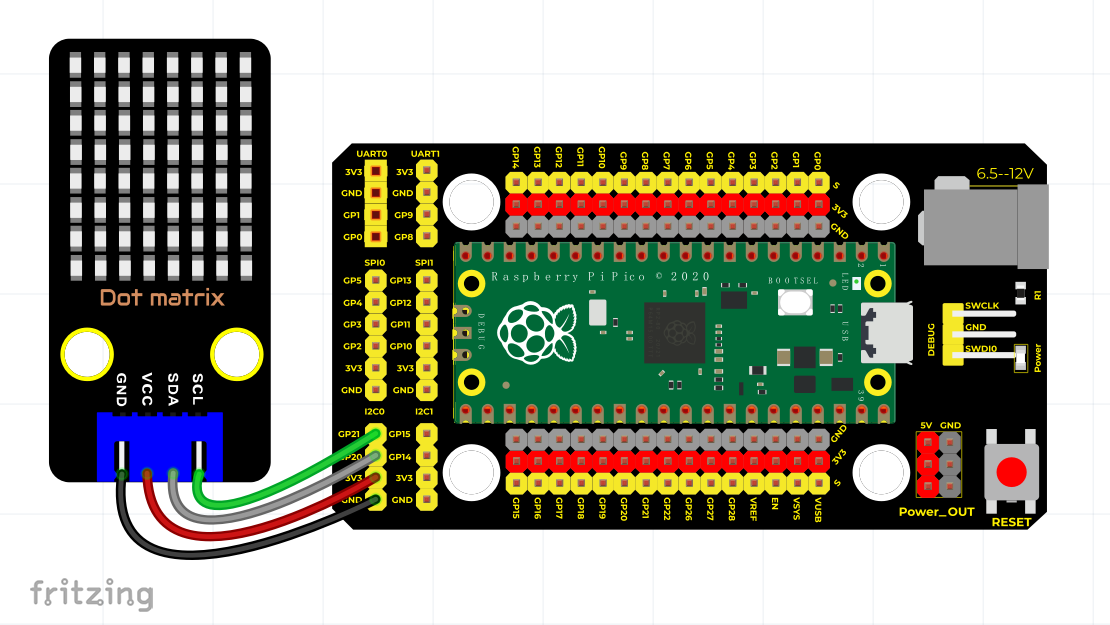
3. 测试代码#
下载资料:Python
import machine
import time
import json
import matrix_fonts
from ht16k33_matrix import ht16k33_matrix

# I2C配置
clock_pin = 21
data_pin = 20
bus = 0
i2c_addr_left = 0x70
use_i2c = True

def scan_for_devices():
    i2c = machine.I2C(bus, sda=machine.Pin(data_pin), scl=machine.Pin(clock_pin))
    devices = i2c.scan()
    if devices:
        for d in devices:
            print(hex(d))
    else:
        print('no i2c devices')

if use_i2c:
    scan_for_devices()

left_eye = ht16k33_matrix(data_pin, clock_pin, bus, i2c_addr_left)

def show_char(left):
    if use_i2c:
        left_eye.show_char(left)

def scroll_message(font, message='hello', delay=0.05):
    left_message = ' ' + message
    right_message = message + ' '
    length = len(right_message)
    char_range = range(length - 1)

    for char_pos in char_range:
        right_left_char = font[right_message[char_pos]]
        right_right_char = font[right_message[char_pos + 1]]
        left_left_char = font[left_message[char_pos]]
        left_right_char = font[left_message[char_pos + 1]]

        for shift in range(8):
            left_bytes = [0, 0, 0, 0, 0, 0, 0, 0]
            right_bytes = [0, 0, 0, 0, 0, 0, 0, 0]

            for col in range(8):
                left_bytes[col] = left_bytes[col] | left_left_char[col] << shift
                left_bytes[col] = left_bytes[col] | left_right_char[col] >> (8 - shift)
                right_bytes[col] = right_bytes[col] | right_left_char[col] << shift
                right_bytes[col] = right_bytes[col] | right_right_char[col] >> (8 - shift)

            if use_i2c:
                left_eye.show_char(left_bytes)

            time.sleep(delay)

while True:
    show_char(matrix_fonts.textFont1['A'])
    time.sleep(1)
    show_char(matrix_fonts.textFont1['B'])
    time.sleep(1)
    show_char(matrix_fonts.textFont1['C'])
    time.sleep(1)
    scroll_message(matrix_fonts.textFont1, ' Hello World ')
4. 代码说明#
4.1 导入模块#
首先,我们需要导入点阵显示模块和相关的库,包括matrix_fonts模块,它包含字符的模版文件。通过这些导入,我们可以使用各类字符和功能进行显示
4.2 字符显示与滚动显示#
show_char()函数用于显示单个字符,例如show_char(matrix_fonts.textFont1['A'])就是显示字母"A"。scroll_message(font, message='hello', delay=0.05)函数用于实现翻滚显示效果,其中delay参数控制滚动的速度,message参数指定需要滚动显示的字符串。
5. 测试结果#
按照接线图连接好线并运行测试代码后,点阵将依次显示"A"、“B"和"C”(每个字符显示一秒),然后滚动显示"Hello World"文本,并不断循环此操作。